Copilot Studio
 M365 Copilot
 Copilot Cowork
 Autopilots
 Governance

Without much fanfare, Microsoft has quietly rolled out one of the most significant improvements to Copilot Studio: a premium feature called Enhanced Search Results, powered by Semantic Indexing. And this feature is only reserved for tenants which have at least one Copilot for Microsoft 365 license. Just like that, we have entered the era of standard and premium features in Copilot Studio.
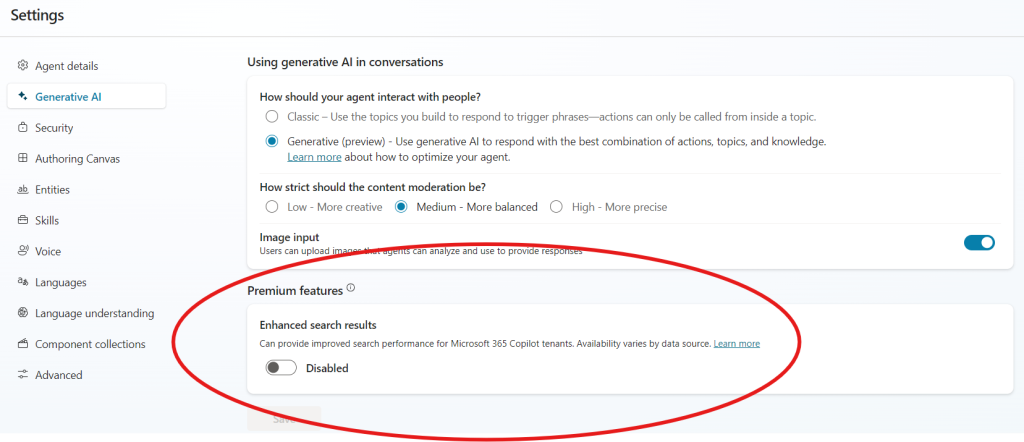
While I'm not sure exactly when it rolled out, it must be fairly recent because I spend time in Copilot Studio almost every day and didn't see it prior to yesterday. The documentation that explains this feature along with others related to Knowledge sources was last updated on January 3, 2025, so it's possible it was a staggered roll-out across tenants as most features are.
This reminds me of something…
Before we get into details, it could be argued that this feature is a lot like the Turbo button on desktop PCs back in the old days. If you're not familiar with what I'm talking about, desktop PCs running on Intel 286, 386 and 486 processors had a Turbo button that was commonly thought of as a way to get the computer to work faster. Consequently, it was always on by default. The reality was that the button existed as a way to allow the user to slow the computer down to run at the speed of an Intel 8086 processor so that games that relied on the processor's frequency would run at a playable rate. When the turbo button was on, the PC was actually running at its standard performance. It could have been called the "Slow Down" button, but no marketing person was ever going to let that happen. So of course someone came up with the idea to call it a "Turbo" button and the rest is history. You can read more about it on Wikipedia.
Back to the news…
In a nutshell, enabling the feature will improve the relevance and performance of search results from within your knowledge and data sources. Having the enable/disable toggle allows the user to disable the feature if it results in lower response quality. If your tenant has a Copilot for M365 license, this feature is enabled by default and the agent supports SharePoint and Microsoft Graph connectors containing files up to 200 MB in size. In the case of PDF, DOCX and PPTX files, the max supported file size is 512 MB.
There are basically two angles to discuss here – one is the technical angle, and the other is the marketing and licensing angle.
The Technical Angle: What is Semantic Indexing and why should you care?
You can read a very detailed explanation of Indices and Semantic Indexing here on Microsoft Learn, but here's a primer:
(Editor's note: this primer below is a combination of human and AI-generated content; part of it is written by the author and part of it is a summary of the Microsoft Learn documentation generated by prompting Copilot):
Semantic Indexing in the context of Microsoft Graph and Copilot refers to the process of creating vectorized indices from content within Microsoft Graph. These indices help in producing contextually relevant responses to user queries by understanding the relationships between different forms of words and concepts.
It is central to how Copilot for Microsoft for 365 works and uncovers data in conversational searches, or for productivity features in Word, PowerPoint, etc. And it is important to note that Semantic Indexing is only available when there is a Copilot for Microsoft 365 license in the tenant.
The significance of adding a premium feature like Enhanced Search in Copilot Studio is that even if you do not intend to deploy your Agent as a plugin for Copilot BizChat Work (which is only available for users with Copilot for Microsoft 365) your agent can still benefit from Semantic Indexing.
Here's how it works:
- Vectorization: Data points (like words or images) are converted into numerical representations called vectors. These vectors are arranged in multi-dimensional spaces where similar data points are clustered together.
- Enhanced Search: This allows Microsoft 365 services, including Copilot, to handle a broader set of search queries beyond exact matches. It supports an enhanced content grounding and conceptual understanding of your data.
- Personalization: The semantic index helps in personalizing search results based on user interactions and connections within the Microsoft 365 ecosystem.
To give you an example, imagine a scenario where you have hundreds of data points that have been arranged into a multi-dimensional space as described in the Vectorization bullet point above. Let's imagine some of these data points are food items. In general, data points for food items will be clustered closer together, but even within them, similar food types will be clustered closer together. You can see this in the image below where meat-based foods are clustered close together and at a little distance you have baked goods like muffins and donuts. At a slight distance still are coffee and tea. These are closer in proximity to muffin, donuts and breakfast than they are to meats. So, when someone searches the index for coffee or a similar word or topic, relevancy will be determined by data points closer to it. Your results will include coffee, and possibly tea, maybe donuts, but it is very unlikely that it will include anything about lobster meat.
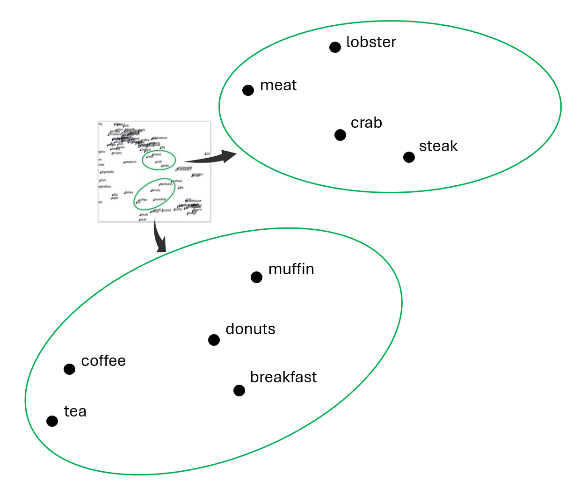
This is just one example of a dimension. You could have other dimensions like color, temperature, etc. If you were looking for things that are brown, you may suddenly find that tea and coffee are clustered a lot closer to steak and wood in that dimension.
To wrap up this primer, it should be noted that indexing is automatically enabled by Microsoft in tenants with Copilot for Microsoft 365, and respects all organizational boundaries within your tenant, ensuring security and compliance.
Marketing and Licensing Impact
By creating this feature, Microsoft is basically exposing the inner workings of Copilot and how the technology works to show how makers in tenants that do not have Copilot for Microsoft 365 licenses are missing out on the power of Semantic Indexing. A hundred whitepapers and marketing campaigns on this would not have the same impact as creating a toggle showing makers what they and their agents are missing out on. Everyone wants their Agent to get the best search results and generate the best outcomes.
And by defining this as a premium feature, Microsoft makes it clear that Copilot Studio's inability to leverage semantic indexing is not so much a deficiency of the product, but it's just a feature not available at the entry-level price point. Pony up for some Copilot for Microsoft 365 licenses which already heavily relies on it for its own searches, and now you've got this great capability you can offer in your custom-built Agents. And Microsoft's own studies like the 2023 Work Trend Index show that once users get a chance to experience the productivity enhancements they get with Copilot for Microsoft 365, they are unlikely to want to give it up. And with only an annual licensing option, once a user gets a Copilot for Microsoft 365 license, they cannot cancel it after month, three or five. They have a year to live with it, and frankly, that is plenty of time overcome resistance and embrace the value. Once you have a few believers in the organization, others will want it too.
Essentially, this play can help drive up licensing and adoption in organizations there weren't initially looking to do anything other just create their own custom Copilots and Agents.
Smart move, Microsoft, smart move!