Copilot Studio
 M365 Copilot
 Copilot Cowork
 Autopilots
 Governance
In February 2026, The Register reported that only 3.3% of Microsoft 365 and Office 365 users who touch Copilot Chat were paid users. It should come as no surprise to anyone that Microsoft is not only aware of this problem, but it doing everything it can to increase that number - from financial investments in improving features and capabilities to trying out new ways to catch the attention and wallets of their B2B customers.
In recent months, we saw the roll out of agentic capabilities in Copilot, specifically within Office apps. Originally rolled out as Agent Mode, it's already gone through two renaming adventures - Edit with Copilot, and now Allow Editing.
Unannounced UI Changes to Copilot in Office Apps
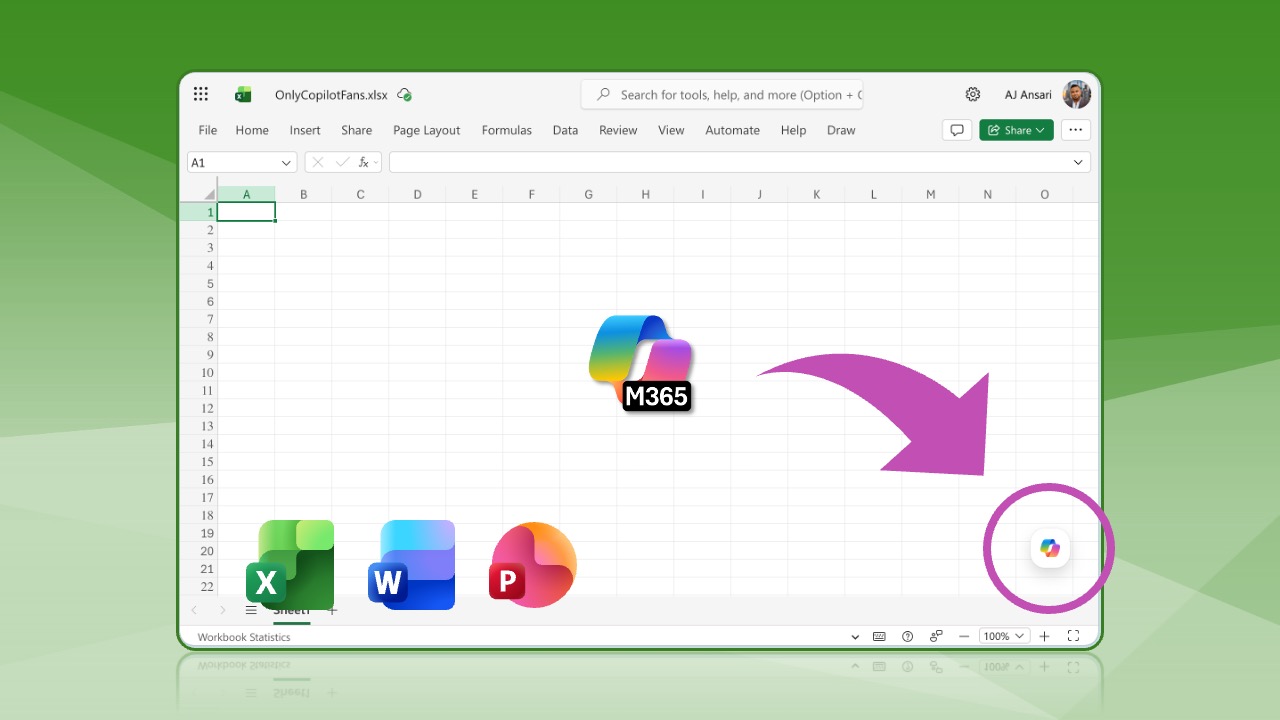
But the changes they are making are not just limited to functionality. A month or two ago, I noticed one morning that the Copilot icon had gone missing in my Excel app's ribbon. It was still there for Word, PowerPoint, and Outlook. I thought it was a license activation issue, so I tried logging out and back in, restarting my laptop, etc. I have two M365 tenants with paid M365 Copilot licenses, and everything was working fine in my second tenant. Eventually, after a couple days, I noticed that in both tenants, it began to appear as a floating icon near the bottom right of the Excel app.
Inconsistencies Galore
In time, this change also made its way to Word and PowerPoint. But Outlook? Nope. The web version of Outlook still shows the Copilot icon in the ribbon. The desktop app (Mac) shows it in the ribbon but it looks very different. So now, you have three different experiences for accessing Copilot across the mainstream Office apps. This creates confusion which hurts adoption instead of helping it.


I get that Microsoft was/is probably trying new things to see if people notice Copilot more, interact with it more, and find more reasons to get a paid license. And there's also some A-B testing going on. But as a paying and regular user, I found it very jarring to just have things moved around with no announcement or even an in-app notification. I was rather frustrated to not find the Copilot icon for two days. It's possible it was floating there at the bottom of my app window all along, although I'm reasonably sure that wasn't the case.
Microsoft: We Broke It, We'll Fix It
I thought perhaps I was the only one upset about all of this, but it appears there was enough blowback to this that Microsoft decided it was time to acknowledge and make (yet another) change. In a Microsoft 365 Insider Blog post dated May 21, 2026, Partner Group Product Manager Katie Kivett wrote, "As we continue to thoughtfully and intentionally shape how Copilot integrates with the tried-and-true workflows within Word, Excel and PowerPoint that you rely on, we’re listening, learning and improving as we go. To that end, we're already making a few updates based on feedback."
Tutorial: How to Dock the Floating Copilot Icon
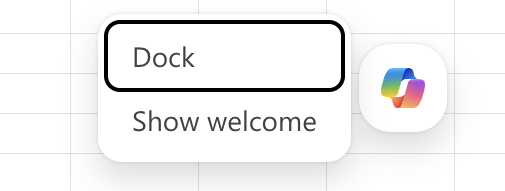
The change Katie wrote about works thus: Right-click the floating Copilot icon near the bottom-right of the window in Excel, Word, or PowerPoint and you'll be an option to Dock Copilot. Clicking it adds a little pinned rainbow-colored tag near the bottom-right of your app window.
Right-Click Copilot Icon to view options
Docked Copilot 'icon' / tag

But Is It Really a Fix?
On the one hand, I genuinely appreciate the acknowledgement of the feedback and the attempt to act upon it. But, it's a missed opportunity to give users back what they liked. I feel rather confident in saying that the strongest negative feedback was probably from users who are paying M365 Copilot users and were used to finding the Copilot icon in the Office apps' ribbon. From other articles on the internet, I've read that some users were also upset because the new floating icon covers up cells in Excel, or text in Word, etc.
So, Microsoft clearly had two issues to address here. They decided to fix only one: the problem of the floater blocking the text below it. To my friends at Microsoft, I say, if you're offering to fix something, at least offer one option that allows users to go back to the way things were, i.e. give us an option to get the Copilot icon in the ribbon again.
Perhaps someone in the Office 365 or M365 Copilot team will see this and fix. One can only hope.