Copilot Studio
 M365 Copilot
 Copilot Cowork
 Autopilots
 Governance

There's a lot you can do with Copilot Studio. You can build standalone Copilots Agents for your website, for your mobile apps, for your messaging and collaboration tools like Teams, Slack, etc. You can also build declarative Agents to extend Copilot in M365 BizChat and your Office apps like Word, Excel, Outlook, PowerPoint etc.
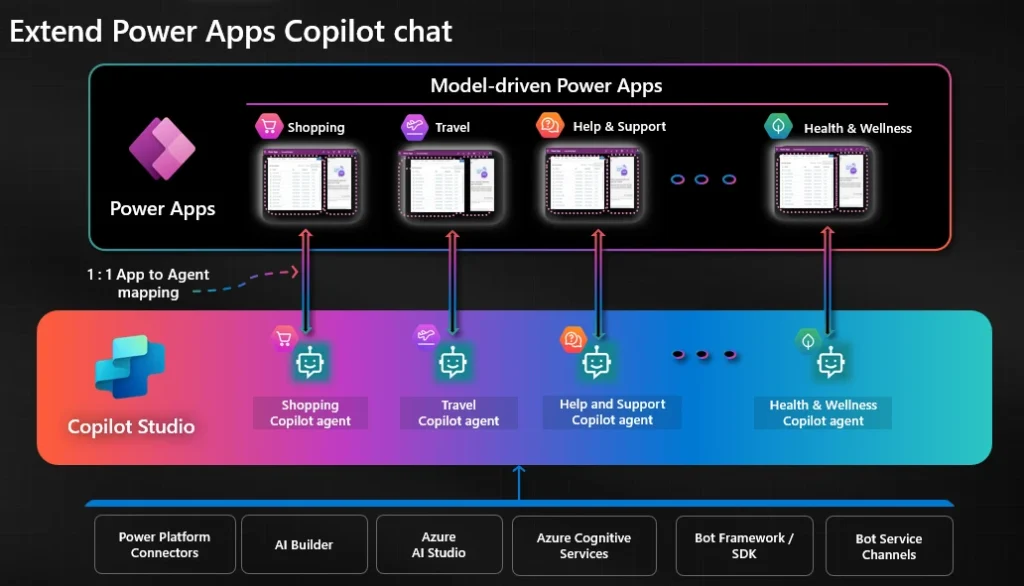
On January 9, 2025, Microsoft announced that you will now also be able to extend the Copilot chat in the model-driven apps created with Power Apps. The feature is in public preview at this time, which means that you may not see it in your environment at this time.
So how does it work?
First, make sure you are in an early release environment (click here for instructions on creating one) of Power Apps and you navigate to the Power Apps maker page using the https://make.preview.powerapps.com URL.
Every time you create a model-driven app in Power Apps, a dedicated Copilot Chat Agent will be provisioned in Copilot Studio in the same environment as the app.
To get to this Agent, you can either go straight to Copilot Studio, switch to the environment in question, and find it in the list of Agents, or from the app itself which will take you to the agent in Copilot Studio.
Once you are in Copilot Studio, you can add more Knowledge Sources, Topics, etc. to extend the capabilities of your app's Copilot Chat.
See an end-to-end walkthrough of this process in the short animation below:
You can read the announcement in full on the Microsoft Power Apps Blog here.